Product types
The product type
A product’s type is usually the name of the product itself, what defines it as such. For example, an “Apple Macbook” would be of type “laptop”, just as a “Nintendo Wii” would be a “game console”. Types are usually written in the plural (i.e. “Laptops”) because this lets you use them in navigation menus.
By definition, a product can only belong to one type, since the type is what defines its attributes, based on its nature. You define these attributes yourself.
For example, all bicycles have a rim size, a number of gears and a specific material. So when you create the “Bicycles” type, you would define those three attributes, so that when you add a new bicycle to your catalog you enter the values for those attributes, in addition to its model, price and description.
You can mark attributes as required for all products of that type, or leave them as optional. This means that when you assign a product to that type, Bolder will require that field to be filled in before saving the changes.
What is NOT a product type
It’s easy to confuse a collection or a tag with a product type, since both can be used to group products in a store. Based on the previous definition, “Bicycles” would be a valid product type, but “Featured” would not, since that doesn’t define a product in itself.
“Featured”, in particular, is a good example of a product collection, which we’ll cover later.
How to create a product type
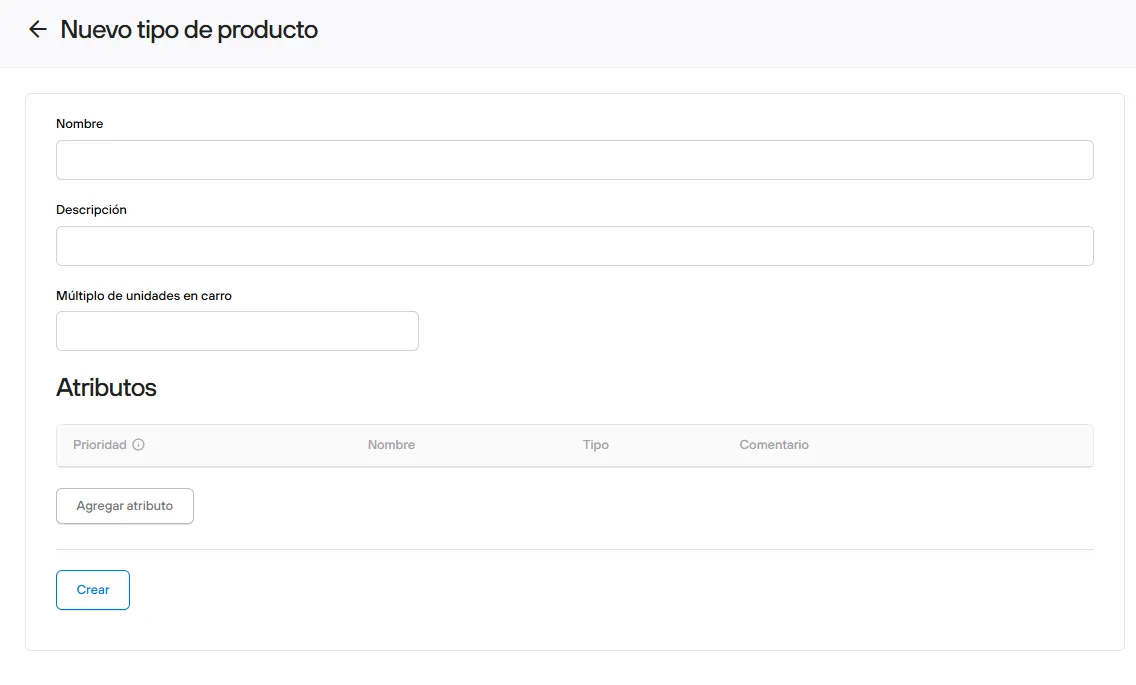
When editing a product, click the «Manage product types» link. The steps are:
- Click «New product type»
- Enter a name, for example: «Microwave»
- Name of the first attribute, for example: «Power»
- Type: You have 6 options here, for example: «Short text»
- Comment: a short phrase that describes the attribute, for example: «In Watts»
- Required: sets whether the field is required or not.
There is no limit to the number of attributes you can add to a product type; you can add as many as you want.