---
title: "Redirect a domain without www to one with www"
---
## Defining the scenario
If you already have a website hosted on your own server (for example, **acme.com**) and want to keep that infrastructure, you can use your Bolder store under the **www** subdomain (for example, [**www.acme.com**](http://www.acme.com)).
To do this, go to your domain's DNS settings and create a **CNAME** record named **www**, pointing to the value `proxy.onbolder.com`.
## Redirecting the domain
Once the **CNAME** record is set up, the domain [**www.acme.com**](http://www.acme.com) will show your Bolder store correctly. However, the domain **acme.com** (without **www**) will keep pointing to the infrastructure where the original site is hosted.
For all your customers to reach the new Bolder store using a single domain, you need to set up a **permanent (301) redirect** from the **non-www** version to the **www** version. This way, any visit to **acme.com** will be automatically redirected to [**www.acme.com**](http://www.acme.com), **ensuring a consistent experience for users and avoiding duplicate content for search engines.**
## Solution options
Here are 4 solution options:
### 1\. Redirect from cPanel
In cPanel, in the Domains section, go to "Redirects" (in Spanish, «Redirige»).
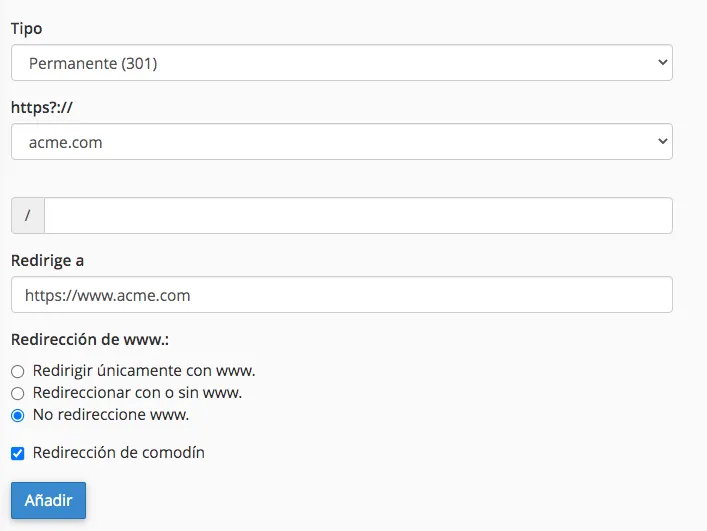
Once there, enter the following information:
- Type: Permanent 301
- In https?://(www)?: Select the domain.
- Leave the field that starts with / *empty*.
- In redirects to enter: `https://www.acme.com`
- In www redirection: click "Do Not Redirect www".
- Click "Wild Card Redirect".
- Finally, click "Add"
### 2\. Apache redirect
If your server uses Apache (as most web servers do), you can create a file named `.htaccess` in the root of your site with the following content:
RewriteEngine On
RewriteCond %\{HTTP\_HOST\} ^acme\\.com$
RewriteRule ^(.\*)$ "https\\:\\/\\/www\\.acme\\.com/$1" \[R=301,L\]
### 3\. Redirect using PHP
If your server supports PHP, you can edit the `index.php` page with the following:
\
### 4\. Redirect using HTML
Another option is to use HTML. Edit the `index.html` file and enter the following:
\
\
\
\
\
\
\