

Setting up Google Analytics in Bolder
What is Google Analytics?
Google Analytics (GA4) is a free web analytics service offered by Google that generates statistics about the visitors to your website. In short, it gives you useful information about your customers’ behavior, for example: number of visitors, average duration of each visit, number of pages viewed per customer, geographic or sociodemographic reports about them, even clicks directly related to a sale. Thanks to this kind of data, a store can make changes after analyzing this information.
Activation and initial setup in Bolder
To turn on this feature:
- Go to the Bolder admin panel.
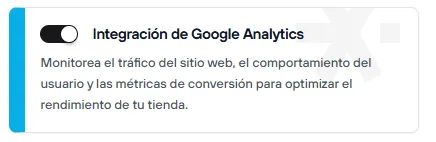
- Go to the Addons and Integrations section, in the Seller storefront category, and turn on Google Analytics Integration
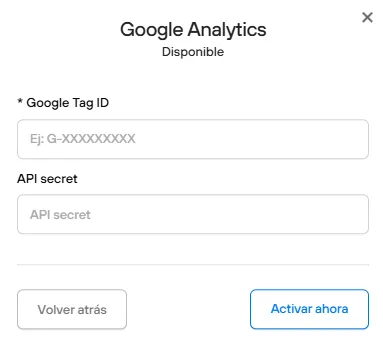
- Once it’s on, you will need to enter the measurement ID and the API secret of your property.
Check here how to create your GA4 property and how to get the activation details
Important: Wait 24 hours
Keep in mind that Google Analytics can take up to 24 hours to start recording statistics, so you need to wait to see the results. After the waiting time, log in to your GA account and you will be able to see the statistics.