

Add a popup or featured message on my store's home page
Activating a welcome popup is a great option if you want to boost a marketing campaign, highlight a milestone of your business, or invite people to read a particular news item.
The steps are very simple:
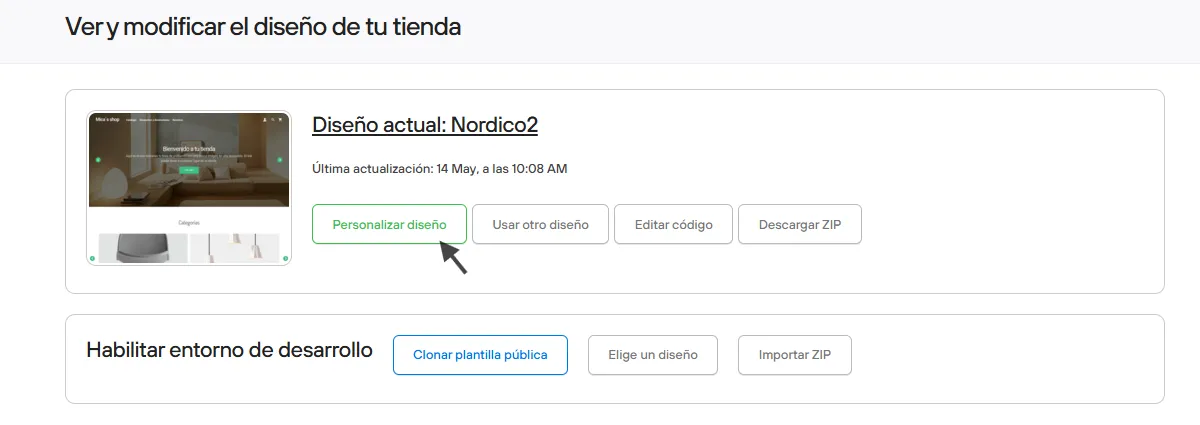
- Go to your store’s admin panel
- Design
- Customize current design.
Then click the tab called “Widgets” and go to the Welcome Popup option.
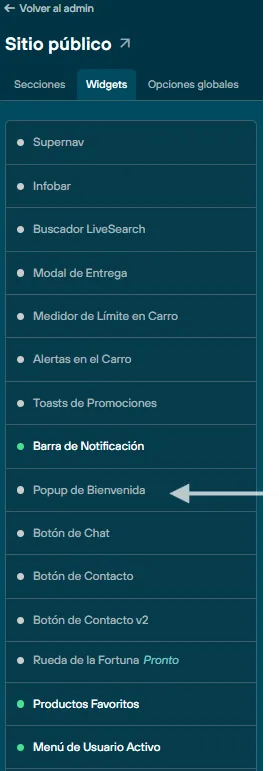
Click the section to set it up.
Here you must upload an image of at least 600×600px, square or rectangular.
You can add a link that leads to a specific place on your site or another site, and you can also add a title and description if you need them. Before finishing, don’t forget to activate the change.
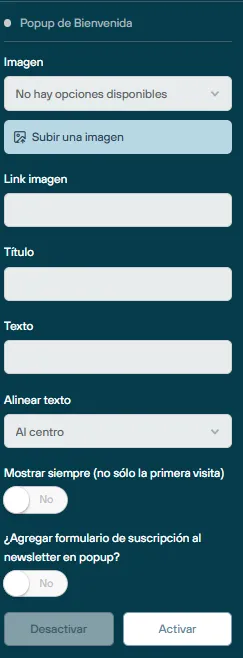
When you activate a welcome popup, you have the option to add a subscription form for your customers, who must enter their name and email to join your store’s promotional list. We suggest adding a customer tag, so you can segment customers and make this useful for your marketing campaigns.
An attractive welcome popup will capture the attention of your customers and potential customers from the very first moment.