

Redirect a domain without www to one with www
Defining the scenario
If you already have a website hosted on your own server (for example, acme.com) and want to keep that infrastructure, you can use your Bolder store under the www subdomain (for example, www.acme.com).
To do this, go to your domain’s DNS settings and create a CNAME record named www, pointing to the value proxy.onbolder.com.
Redirecting the domain
Once the CNAME record is set up, the domain www.acme.com will show your Bolder store correctly. However, the domain acme.com (without www) will keep pointing to the infrastructure where the original site is hosted.
For all your customers to reach the new Bolder store using a single domain, you need to set up a permanent (301) redirect from the non-www version to the www version. This way, any visit to acme.com will be automatically redirected to www.acme.com, ensuring a consistent experience for users and avoiding duplicate content for search engines.
Solution options
Here are 4 solution options:
1. Redirect from cPanel
In cPanel, in the Domains section, go to “Redirects” (in Spanish, «Redirige»).
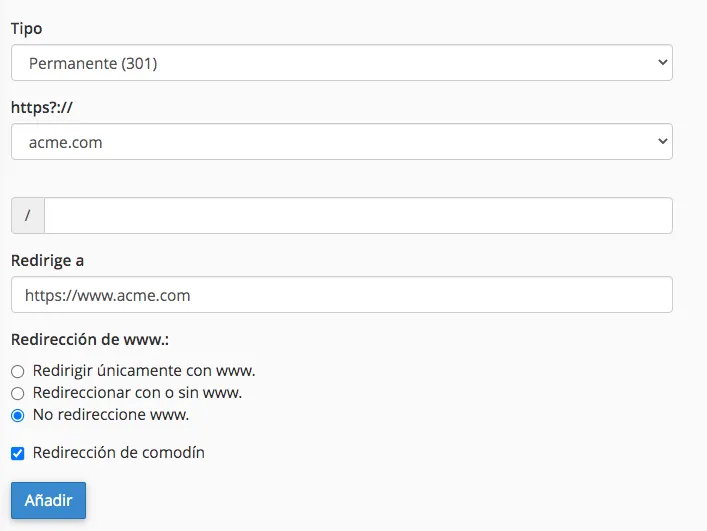
Once there, enter the following information:
- Type: Permanent 301
- In https?://(www)?: Select the domain.
- Leave the field that starts with / empty.
- In redirects to enter:
https://www.acme.com - In www redirection: click “Do Not Redirect www”.
- Click “Wild Card Redirect”.
- Finally, click “Add”
2. Apache redirect
If your server uses Apache (as most web servers do), you can create a file named .htaccess in the root of your site with the following content:
RewriteEngine On RewriteCond %{HTTP_HOST} ^acme\.com$ RewriteRule ^(.*)$ “https\:\/\/www\.acme\.com/$1” [R=301,L]
3. Redirect using PHP
If your server supports PHP, you can edit the index.php page with the following:
<?php header(‘Location: http://www.acme.com/’); exit; ?>
4. Redirect using HTML
Another option is to use HTML. Edit the index.html file and enter the following:
<!DOCTYPE html>
<html>
<head>
<meta charset=“utf-8”>
<meta http-equiv=“refresh” content=“0;URL=‘http://www.acme.com/’” />
</head>
</html