

Orders table update: key information in a single view
This update aims to optimize order management and improve the visibility of each order, making daily order handling easier.
The new table includes substantial improvements, both visual and functional:
-


Restructured fields, design and layout of the information. The new table offers a clearer and more intuitive view, with visual elements such as relevant icons and logos, along with a color gradient that better highlights the different statuses (keeping the original color structure).
-
Simplified access to the details of each order. Each order now includes a logo that identifies the sales channel, which is especially useful for businesses that work with Bolder Sync.
-
Items and units shown per order. This information helps you understand more precisely the size and type of each purchase.
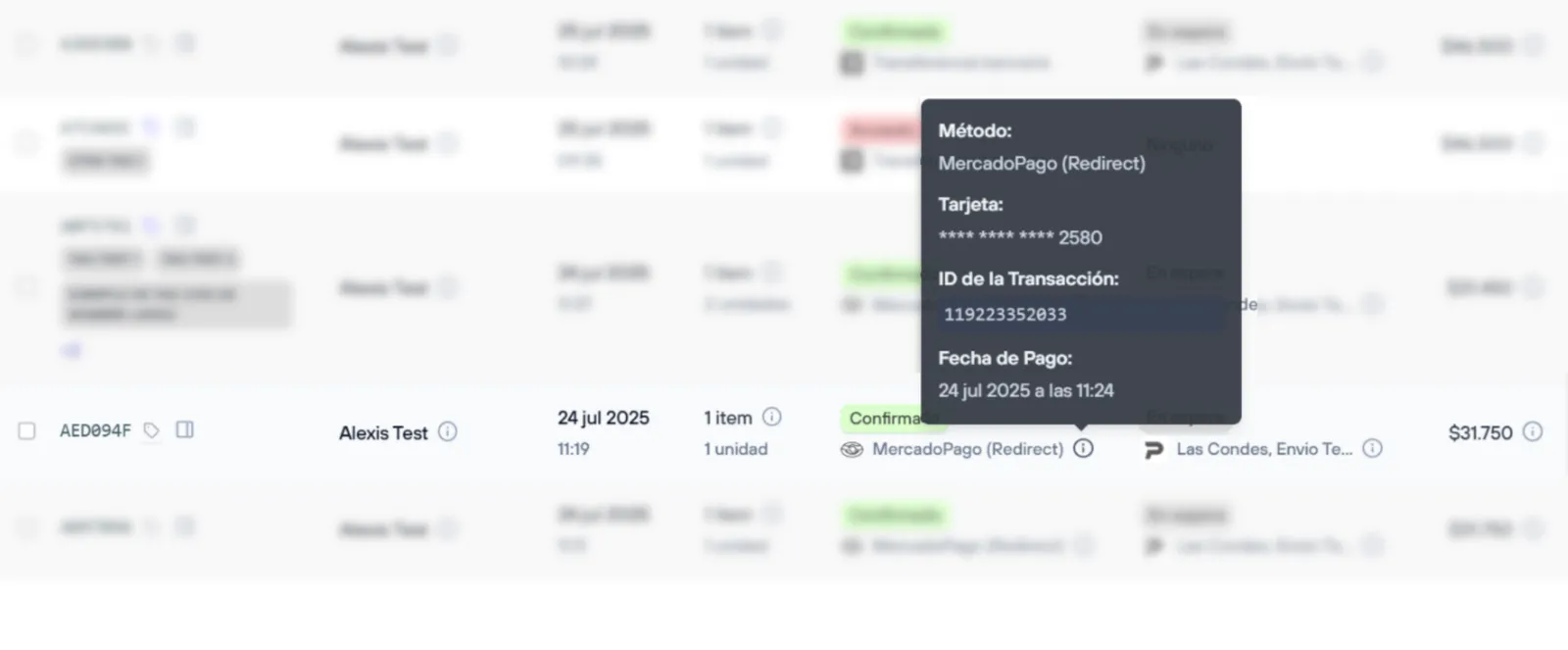
- Payment status and payment method visible at a glance. You no longer need to apply additional filters to see this key information.
- A single total per order. The total value of each order is easier to read, removing possible confusion.

- Informational tooltips. When you hover over the ⓘ icon, relevant order information is displayed, so you can do a quick review without opening the details of each order.
-
Quick actions from statuses and tags.
You can now change an order’s status and choose to send a message to the customer directly by clicking the payment or delivery status. You can also add or remove order tags from the tags modal by clicking the corresponding icon.
These changes are designed to allow faster and more accurate decision-making when tracking orders, optimizing operational and business flows.
This update also comes with an important milestone.
The previous version of the admin panel will no longer be available starting September 1, 2025. If you are still using that version, we recommend starting to work with the new one as soon as possible. All of our team’s efforts are focused on improving and enhancing the tools available in the current version.