

Enable PayPal Express as a payment method
PayPal Express Checkout is a solution that speeds up the payment process by letting customers complete their purchases without leaving your website. It offers a smoother experience and can help increase conversion rates.
Enabling process
Enabling PayPal Express requires the following
-
Create a Business account on PayPal:
- Go to the PayPal website and choose the option to create a Business account.
- Fill out the sign-up form with your company’s information and follow the instructions to verify your account.
-
Get the API credentials (username, password and signature):
- Log in to your PayPal Business account.
- Go to the account settings section and select “API access”.
- Choose the option “NVP/SOAP API integration (Classic)” and select “Manage API credentials”.
- Request an “API Signature” and, once it is generated, write down the username, password and signature provided.
Activate PayPal Express in your Bolder store
With the information from the previous step, go to your Bolder admin panel and navigate to Preferences > Purchase options > Payment methods
In the payment method selector, choose PayPal Express
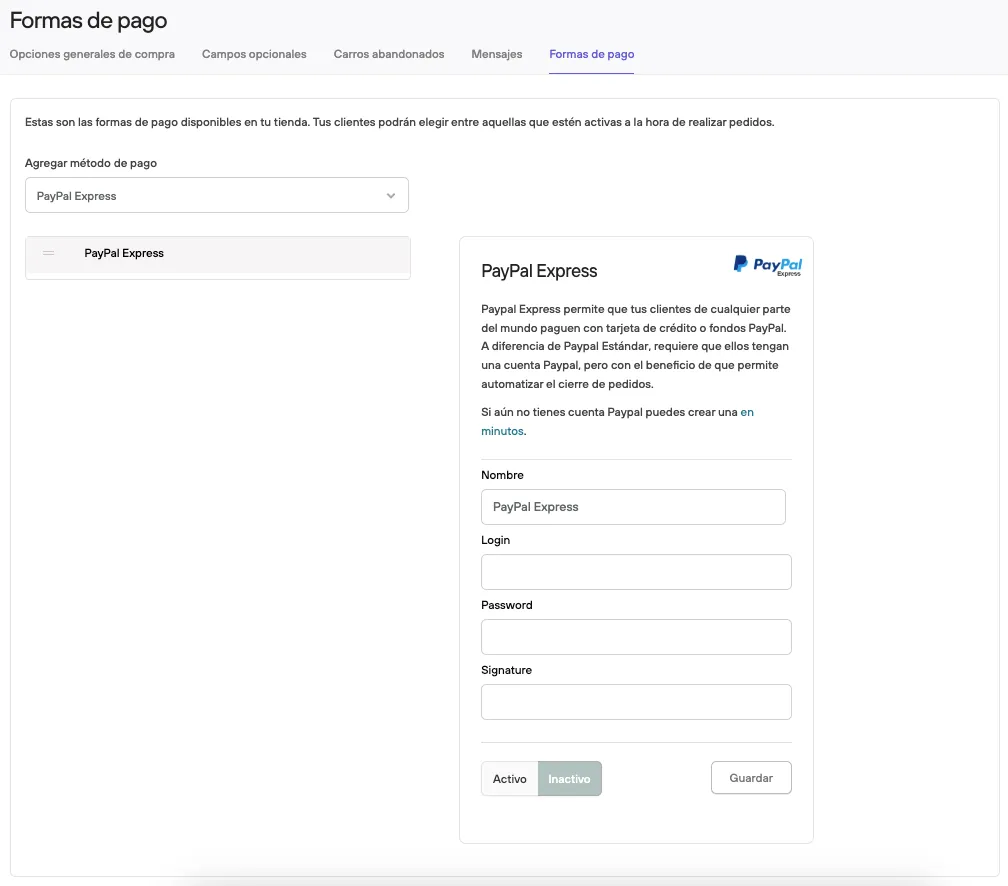
Complete the information linked to your PayPal business account, then click Active and Save.
Before making it available to your customers, we recommend placing a test order and checking that everything works correctly (and that the amount paid has reached your PayPal account).
See also: PayPal Standard, where customers are redirected to the PayPal site and you only need your account email.