

Enable PayPal as a payment method
PayPal Standard is a payment solution that lets merchants accept online payments easily. Customers are redirected to the PayPal site to complete the transaction, which makes it easy to set up and does not require complex technical configuration.
Enabling process
Enabling PayPal Standard requires the following
- Create a Business account on PayPal:
- Visit the PayPal website and choose the option to create a Business account.
- Fill in the sign-up form with your company’s information and follow the instructions to verify your account.
Activate PayPal Standard in your Bolder store
With the information from the previous step, log in to your Bolder admin panel and go to Preferences > Purchase options > Payment methods
In the payment method selector, choose PayPal
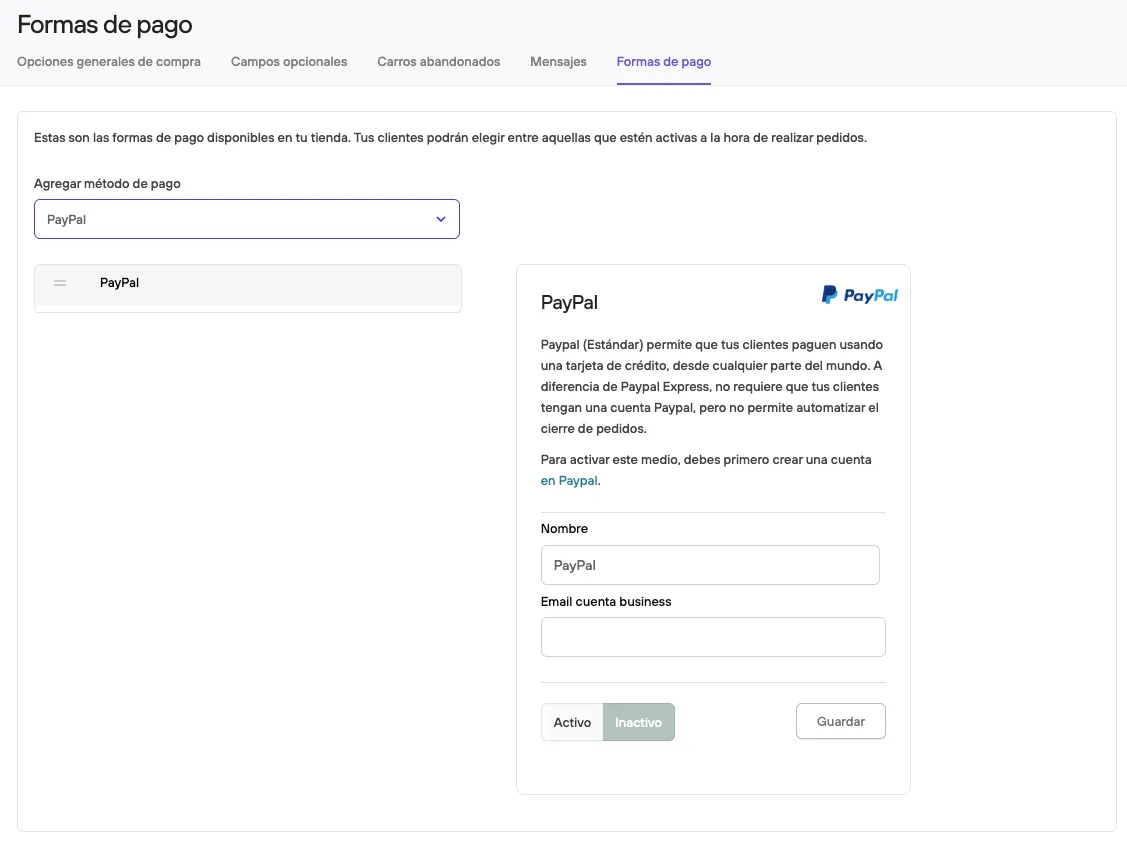
Fill in the information with the email linked to your PayPal business account, then press Active and Save.
Before making it available to your customers, we recommend making a test purchase and checking that everything works correctly (and that the amount paid has reached your PayPal account).
See also: PayPal Express, where customers pay without leaving your site and API credentials are required.